
Cyberattacks rarely look like the dramatic hacking scenes shown in movies. More often, they arrive disguised as something completely mundane like a text from “the bank,” a delivery notification or a login alert and they work precisely because they don’t raise any immediate suspicion. Most successful scams don’t rely on advanced technical skill; they rely on people being busy, distracted, or simply unaware of a few basic precautions.
This is precisely why cybersecurity has become an everyday concern rather than a niche technical one. Nearly every part of modern life now has a digital footprint- banking apps, cloud photo albums, work email, food delivery accounts, even smart doorbells and thermostats. Each of these is a small access point and attackers don’t need to break into all of them; they just need one weak link to cause significant damage. And the encouraging thing about being safe online is that it does not depend on whether one is technically skilled or not; it simply involves having some good practices. According to Consegic Business Intelligence, the global Cloud Security Market is projected to grow from USD 37.48 billion in 2023 to over USD 101.04 billion by 2031, driven by increasing cyber threats, rapid cloud adoption, and growing demand for advanced security solutions.
Unique Passwords for Every Account
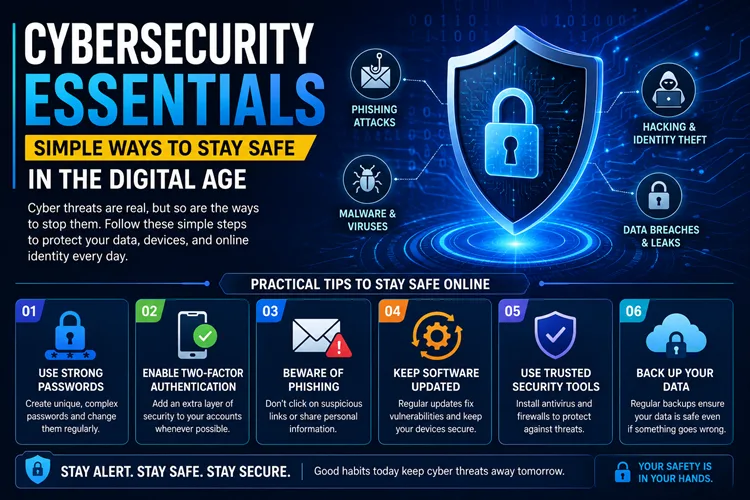
Password reuse is another classic mistake many people make concerning password security. The data breach at one website leaves every other website where the same password is used open to attack. Password managers like Bitwarden and 1Password or even those already included in most web browsers take care of this problem, because they will create and store unique, strong passwords without you having to remember hundreds of them. Long passphrases are usually more secure than shorter passwords with all kinds of symbols, while being easier to remember.
Two-Factor Authentication, Particularly for Email
Email accounts often serve as the recovery point for everything else- banking, shopping, social media. If an attacker gains access to someone’s inbox, they can typically reset passwords across most of that person’s other accounts. Two-factor authentication adds a second checkpoint, usually a one-time code sent to a phone or generated through an authenticator app, meaning a stolen password alone isn’t enough to break in. It takes only a few minutes to enable and significantly reduces risk, making it one of the highest-value security steps available to the average user.
A Pause Before Reacting to Urgent Messages
Phishing attempts are built around urgency: warnings that an account will be suspended, alerts about unusual logins, or notifications about an unclaimed prize. The need for speed is purposeful and intended to get people moving before they can even consider it. The prudent thing to do would be to overlook the connection altogether and verify through the official source. In most cases, the “urgent issue” doesn’t exist at all. It also helps to look closely at sender addresses and URLs, since scammers often use domains that look almost identical to the real ones, differing by a single letter or an extra hyphen.
Keeping Software Up to Date
Update notifications are frequently dismissed as an inconvenience, but many of them contain patches for security vulnerabilities that are already being actively exploited. Enabling automatic updates on phones, laptops and routers ensures this protection happens quietly in the background, without requiring ongoing attention. This applies to lesser-noticed devices too — smart TVs, home security cameras, and other connected gadgets are just as capable of being compromised if left running outdated firmware.
Caution With Public Wi-Fi
Public networks at cafés, airports, or hotels aren’t inherently dangerous, but they aren’t private either. Sensitive activity such as banking or checking email is best avoided on public Wi-Fi unless a VPN is being used. Disabling a device’s automatic Wi-Fi connection feature also prevents it from silently joining unfamiliar networks that may have been set up specifically to intercept data.
Limiting What’s Shared Publicly
Posting information such as a date of birth, city of origin, or the name of one’s pet seems harmless enough, but all of these pieces of information are the kind of answers used by the website for password retrieval. Often, scammers collect personal data from social media websites through the piecing together of tiny bits of information posted online, sometimes combining many smaller details into a larger profile.
Reviewing App Permissions
Mobile apps often request access to contacts, location, microphones, or cameras well beyond what they actually need to function. A flashlight app, for instance, has no real reason to access a phone’s contact list. Periodically reviewing app permissions and revoking anything unnecessary limits how much personal data is available if an app is ever compromised or found to be mishandling user information.
Regular Data Backups
Ransomware- where a file is encrypted until money is paid for its decryption- is increasingly being used as a way to exploit individuals rather than organizations. Having a backup of the files that is not always linked to the computer is critical so that no data will be lost if the ransomware happens to get into the computer.
Securing Home Routers
A router is the gateway to every device connected to a home network, yet it’s rarely given much attention. Many routers are left with factory-default admin passwords, which are easy for attackers to guess. Changing this password, enabling WPA2 or WPA3 encryption, and avoiding network names that reveal personal information are simple steps that close an easily overlooked gap.
Recognizing When Something Feels Wrong
A slight deviation from usual calls, messages and even offers can be considered a red flag worth investigating. No legitimate business is going to push you to take any actions right away, while any legitimate tech support will never demand remote access to your computer all of a sudden. It is better to take a minute and check the information or just hang up and call the company back using an official number.
Final Thoughts
None of these measures require specialized knowledge- just consistency. A password manager, two-factor authentication and a healthy dose of skepticism toward urgent messages go a long way toward closing the most common entry points attackers rely on. Reviewing app permissions, updating software promptly and securing a home network round out a fairly complete, low-effort defense against the vast majority of everyday threats.
As more of daily life moves online, treating digital security with the same seriousness as locking a front door isn’t excessive caution- it’s simply practical. Most people who avoid falling victim to scams aren’t necessarily more technically skilled than everyone else; they’ve just built a habit of pausing, double-checking and staying a little more deliberate about what they click, share and trust.